Multi-tenancy is the architectural decision that most SaaS teams get wrong on day one and pay for on day three hundred. There are three common models, and they are not interchangeable.
We have built SaaS platforms with all three. Here is what each actually costs.
01The three models, briefly
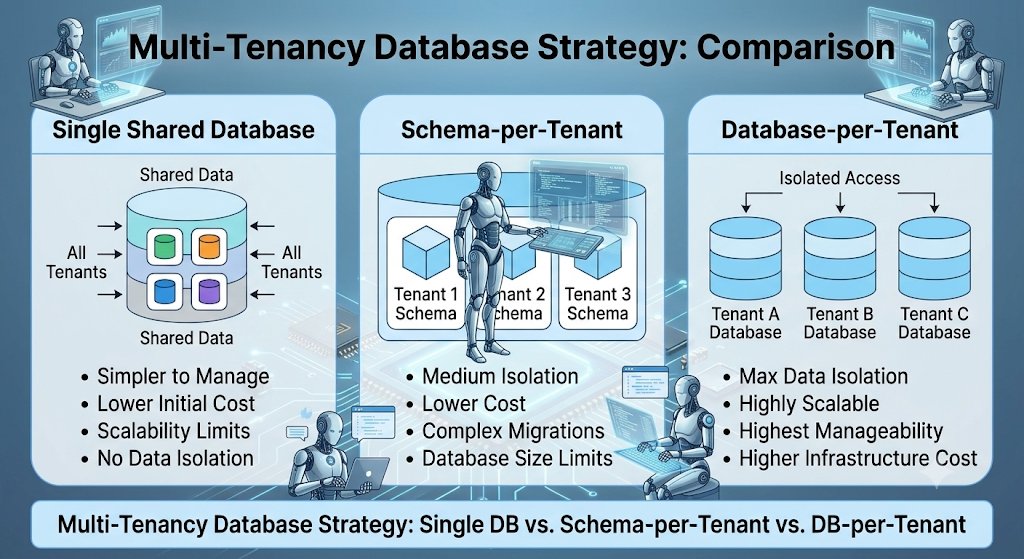
- Single database, shared schema. All tenants share the same tables. Every row has a
tenant_id. - Single database, schema-per-tenant. Each tenant gets its own database schema (in Postgres:
CREATE SCHEMA tenant_123). Tables are duplicated per tenant. - Database-per-tenant. Each tenant gets a fully separate database instance.
- Simplest to build and migrate
- Cheapest infrastructure (one database)
- Easy cross-tenant analytics and reporting
- One connection pool, one backup, one failover
- Security risk: a single query missing the
tenant_idfilter leaks another tenant's data. This happens. We have seen it in production, more than once. - Noisy-neighbor problems: one tenant's heavy query affects everyone
- Scaling requires either read replicas, partitioning, or careful query design
- Compliance: some enterprise tenants will not accept their data in a shared database
- Strong logical isolation without the cost of separate databases
- Per-tenant backups and restores are straightforward (
pg_dump -n tenant_123) - Easier to migrate one tenant's data separately
- Natural fit for compliance conversations ("your data lives in its own schema")
- You can move a large tenant to a dedicated database later with a simple dump/restore of one schema
- Every schema change must be applied to every tenant schema. Migrations must be automated.
- Connection pooling becomes more complex (many small schemas)
- Tools and ORMs need to be schema-aware (Laravel's
stancl/tenancypackage handles this well) - Postgres has a limit on relations per database (about 1.6 billion), but very high tenant counts can still strain planning
- Maximum isolation
- Per-tenant scaling: a large tenant can be moved to bigger hardware
- Per-tenant backups, failover, and disaster recovery
- The easiest story for enterprise compliance
- Operational complexity grows linearly with tenant count. 500 tenants = 500 databases to monitor, backup, patch, and upgrade.
- Migrations must be applied to every database, reliably, with the ability to recover a half-migrated tenant
- Expensive: 500 databases means many database instances or careful pooling
- Cross-tenant analytics become hard (you need a data warehouse)
- Does the customer need contractual data isolation? If yes, model 2 or 3. If no, model 1 or 2.
- What is the expected tenant count in 24 months? Under 500: model 2. Between 500 and 5,000: model 2 with automation. Over 5,000: model 1 with strong RLS.
- Is there a single "whale" tenant? If one customer will be 50% of your revenue, model 3 (or model 2 with the ability to escalate that tenant) is worth it, because that customer will eventually ask for it.
Most teams default to model 1 because it is the easiest to build. Some migrate to model 3 later, because model 1 became unmanageable. Model 2 is often the sweet spot and is the least discussed.
02Model 1: Single DB, shared schema
How it works: all tables have a tenant_id column. Every query is filtered by tenant_id via middleware or global scopes.
Pros:
Cons:
When we recommend it: early-stage SaaS with under ~100 tenants, where you can afford to invest heavily in row-level security and query auditing. Postgres RLS is the tool we use to make this model actually safe at scale.
03Model 2: Schema-per-tenant
How it works: each tenant gets its own schema within the same database server. tenant_123.users, tenant_123.orders, etc. The application resolves the schema name from the tenant context and prefixes queries.
Pros:
Cons:
When we recommend it: the default for most SaaS products between 100 and 10,000 tenants. It gives most of the benefits of model 3 without the operational complexity.
04Model 3: Database-per-tenant
How it works: each tenant has its own database instance. The application routes to the correct database based on the tenant context.
Pros:
Cons:
When we recommend it: enterprise SaaS with under ~200 tenants, especially in regulated industries (healthcare, finance, government) where data isolation is a contractual requirement.
05The decision framework
We ask three questions on every new SaaS project:
06The mistake we made
On one project, we chose model 3 from day one because "enterprise customers will need it". The first five customers were small businesses. We ended up managing five separate databases for customers who would have been perfectly happy in shared schemas, and we had to build migration and backup tooling before we had product-market fit.
We spent four months on infrastructure instead of features. We probably lost one or two customers because the product lagged behind.
The lesson: build for the customers you have, not the customers you imagine. Model 2 lets you escalate a single tenant to model 3 later, which is the flexibility you actually need.
07The takeaway
For most SaaS products, we recommend schema-per-tenant (model 2) as the default. It provides strong isolation, per-tenant backup, and a clean path to database-per-tenant if a single customer grows large enough to justify it. It is the least-discussed model and, in our experience, the most flexible trade-off.
If you are starting with shared schema (model 1), invest in Postgres Row-Level Security and query auditing on day one. It is the difference between "safe at scale" and "one missed where clause away from a data breach".