Every engineer on our team now uses AI coding tools daily. Some use Copilot, some use Claude, some use both. The productivity gain is real. But so is the risk, and the difference between a team that uses AI well and one that does not is almost entirely in where the line is drawn.
Here is our honest breakdown.
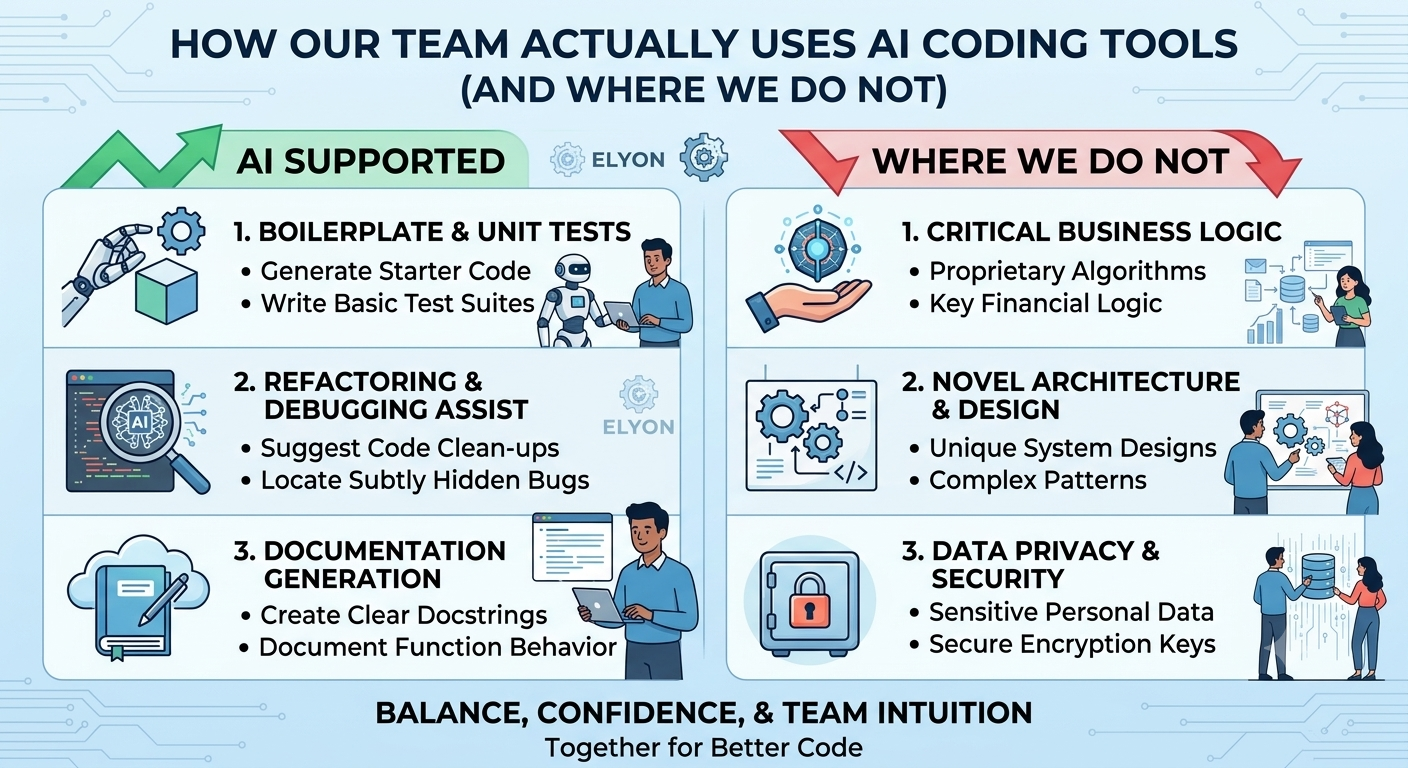
01Where AI is genuinely great
These are the tasks where AI has saved us real, measurable time:
- Boilerplate and scaffolding. CRUD controllers, migration files, DTOs, test skeletons. What used to take 30 minutes takes 3.
- "Explain this code." Drop in a 300-line legacy function and get a plain-English summary. This has cut our onboarding time on inherited projects roughly in half.
- Writing tests for existing code. Given a function, AI writes decent unit tests. We always review them, but the first draft is fast and often good.
- Regex and SQL. "Write me a Postgres query that does X" is a 30-second task now. The results are usually correct and easy to verify.
- Refactoring small, isolated functions. Renaming, extracting methods, converting to modern syntax — all fast and low-risk.
- Documentation. Draft README sections, docstrings, and changelog entries.
- Security-sensitive code. Auth, crypto, payment handling, permission checks. AI writes plausible-looking code that can be subtly wrong in ways that are hard to see. Never let it own these.
- Database migrations that touch production data. AI does not know your data. A migration that looks correct can lock a table for hours or corrupt records.
- Anything an engineer cannot fully explain. This is the most important rule. If a developer cannot read the AI-generated code line by line and explain what it does, it cannot be merged. No exceptions, no "it works".
- Code we do not have tests for. If we cannot verify it with a test, we do not accept it from an AI. The test is the proof.
- AI-generated tests often mirror AI-generated bugs. The tests confirm the code, not the requirement.
- The "explain it" rule would have caught it. The engineer could not have explained why the quoting logic was correct — because it was not.
- One human-written test against a realistic fixture would have caught it. We now require at least one human-authored integration test for every export, import, or file-processing feature.
- Architecture decisions. AI is useful for exploring trade-offs, but the decision must be owned by a human who understands the system.
- Debugging in production. AI can help, but the judgment about "what to roll back, what to patch, what to leave" is human.
- Customer-facing communication. Not a code issue, but worth saying: we do not let AI draft anything that goes to a customer without a human rewrite.
- Hiring. AI does not replace engineers. It raises the bar for what an engineer needs to know — because the AI generates so much plausible-but-wrong code that judgment matters more than ever.
- Use AI for boilerplate, explanation, tests, and refactoring.
- Forbid it for security, data migrations, and anything you cannot explain.
- Enforce the "explain it" rule on every PR.
- Never trust AI-generated tests to validate AI-generated code.
Across the team, our estimate is that AI tools save each engineer 5–8 hours per week on average. That is a real, substantial gain.
02Where we forbid AI
This list is short and non-negotiable:
That fourth point is the one that causes the most friction, and it is the one that has saved us the most.
03The "explain it or lose it" rule
Every PR description must include a one-paragraph explanation from the author of what the code does and why it is correct. Not a description of the change — an explanation of the logic. If the author cannot write that paragraph, the code is not ready.
We started enforcing this about a year ago. Review times went up slightly (maybe 10%), and the number of post-merge bugs dropped noticeably.
It is a simple rule. It stops the "it works, ship it" pattern that AI makes dangerously easy.
04How AI has changed code review
The biggest shift is that reviewers can no longer assume the author deeply understands the code. That assumption was already shaky, but with AI-generated code, it is unsafe.
Our review process now includes a specific question: "Was this AI-assisted? If so, what did you change?" This is not about blame. It is about calibration — reviewers look harder at AI-assisted code, especially around edge cases and error handling.
We have also added a "test coverage of the change" check to every PR. If AI wrote the code and the engineer wrote the tests, that is fine. If AI wrote both, the PR is scrutinized much more closely.
05The bug that taught us the rule
About six months into our AI adoption, we shipped a bug in a CSV export feature. The AI-generated code looked correct, the tests passed (because the tests were also AI-generated and tested the same wrong assumption), and it went out.
The bug: the export silently truncated any string containing a quote character. Real customers noticed within a day.
What we learned:
The fix was five lines. The trust cost was much higher.
06What AI has not changed
A few things remain exactly as they were:
07The takeaway
AI coding tools are the biggest productivity boost we have seen in a decade. They are also the fastest way to ship subtle bugs at scale that we have ever seen.
The difference between teams that benefit and teams that get hurt is not the tool. It is the discipline around the tool:
Get those four things right, and the productivity gain is real and safe. Get them wrong, and you will eventually ship something you cannot debug.